What works here today: a local portrait preview, three room directions, free prompts and real 720p video rendering with optional original audio. Rendering requires a beta access code and daily capacity. This workflow does not accept a custom song or clone a voice.
Start with a performance idea, not a camera trick
An AI Tiny Desk video is a synthetic small-room performance. The room creates context, but the performer should hold your attention. Decide whether the moment is a quiet acoustic verse, a soulful chorus, a keyboard interlude or spoken word before choosing camera moves.
For a first attempt, describe one person in a medium close-up. Keep the camera still and ask for a small head nod or gentle sway. A crowded band, fast fingers and a moving camera introduce several things that can go wrong at once. Add complexity only when the simpler shot gives you a useful result.
1. Pick a portrait that gives the model a clear reference
Choose a sharp image with even lighting, a visible mouth and eyes that are not hidden by glasses or deep shadows. A chest-up portrait provides space for shoulders and a microphone. Very tight face crops can leave the model to invent too much of the body.
- Use an original image you own or a portrait you have permission to use.
- Prefer a neutral or gently expressive face over an extreme pose.
- Avoid hands across the mouth, overlapping faces and strong beauty filters.
- Keep a copy of the original so you can compare facial proportions after rendering.
The free studio can display your portrait beside a music-room reference. This is a planning preview; it does not composite you into a generated scene. The preview stays in this tab until you choose Generate. A downloaded text prompt does not contain the image.
2. Build a room with a few specific details
A desk, shelves, plants and a microphone can suggest intimacy without reproducing a particular show’s set. Choose two or three details that establish the atmosphere. “Soft afternoon window light, a wooden desk and bookshelves” gives clearer direction than a long list of unrelated objects.
Match the setting to the music. Daylight and an acoustic guitar suit a relaxed session. Warm lamps and a close microphone support a quieter soul performance. A small recording room with visible instruments can frame an indie arrangement. These are creative choices, not fixed genre rules.
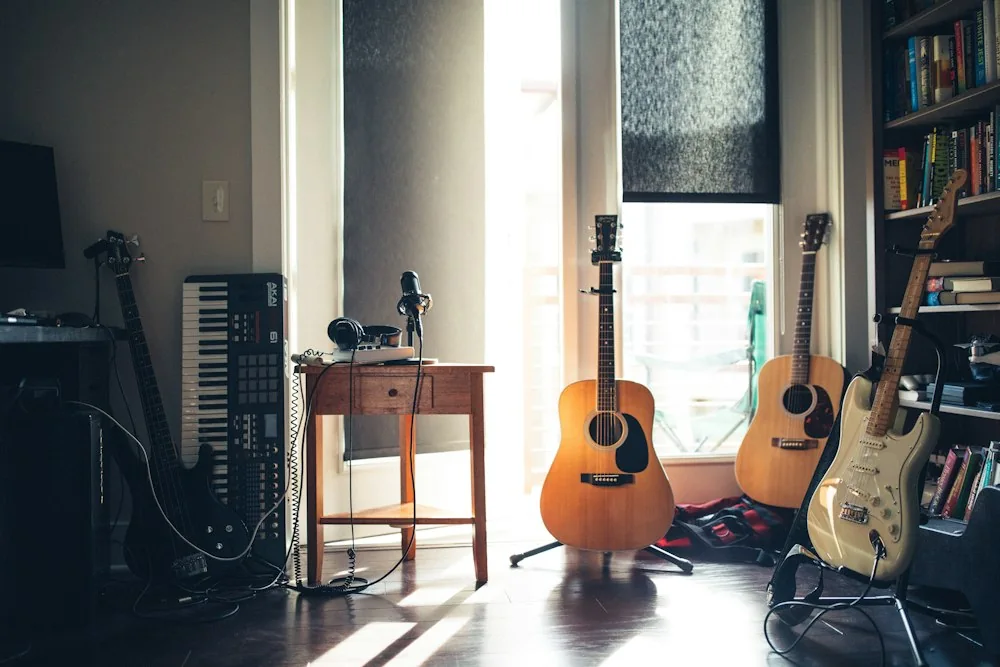
Real photography used for mood and room planning. See image sources.
3. Write the motion before adding more detail
In image-to-video workflows, the reference image often supplies much of the appearance. Use the prompt to explain what changes over time: breathing, a small sway, a glance toward the microphone or a gentle camera push. Keep the action internally consistent.
A useful starting direction is: “The performer gently sings into the microphone, with relaxed shoulders and a small head nod. The camera stays mostly locked in a medium close-up.” Avoid requesting a sweeping orbit, a close-up and a wide room reveal in the same short take.
Our prompt library includes three original starting directions. Different models interpret wording differently. If your provider recommends concise motion-only prompts, shorten the exported direction and keep room details in the source image. Check the provider’s actual supported duration and aspect ratios rather than assuming a prompt changes those settings.
4. Choose your video workflow and render a short take
In our studio, choose 5, 10 or 15 seconds and vertical, landscape or square framing. Enter a beta render access code, confirm your permissions and select Generate. The site prepares a JPEG reference and submits it with your direction to Kie’s Seedance 2.5 model. The output is a 720p MP4; original generated audio is optional.
Start with a short clip at a suitable draft quality, then inspect it before paying for longer or higher-resolution versions. More pixels will not fix an unstable face or a hand that changes shape. Review your provider’s current prices, privacy policy, retry rules and retention windows before uploading.
Keep this tab open while the provider processes your session. Reloading the same tab can recover its status using a private session token. Do not start a second job after a network interruption; check the existing session first. When ready, play the video and download your MP4 promptly because provider links are temporary. For an unconfirmed submission, contact the operator with the session ID before trying again.
5. Treat music and lip sync as their own production step
A singing motion is not the same as singing a specific lyric. If the performance must match a track, use a tool that accepts your authorized audio and explicitly supports synchronization. A text request for a famous song does not grant music rights or guarantee accurate timing.
The composition and the recorded performance can involve separate rights. Your own recording of someone else’s song may still require permission for the composition or intended use. The U.S. Copyright Office’s musician resources explain this distinction. Check rules that apply to your country and publishing platform.
Use your own voice, a licensed voice or a voice you have explicit permission to use. Do not label a synthetic performance as an authentic recording by someone who did not make it.
6. Review the result before it leaves your device
- Face: compare eyes, jawline, teeth and hairstyle with the reference throughout the clip.
- Mouth: watch at normal speed and check lyric timing, consonants and unnatural changes in shape.
- Hands: look for extra fingers, disappearing objects and impossible contact with instruments.
- Microphone: check that it stays stable and does not merge with the face.
- Room: inspect books, cables and background instruments for distracting changes.
- Disclosure: clearly label realistic synthetic media and follow your destination platform’s rules.
If a take fails, simplify the one thing that is unstable. Remove the hand gesture, reduce the camera motion or shorten the action. Rewriting every detail at once makes it harder to know what helped.
Publish with context
Describe the result as an AI-created or AI-assisted fictional performance, as appropriate. Keep source licenses and permissions, and avoid implying an official appearance on NPR’s Tiny Desk Concerts. This website is independent of NPR and does not use its logo or claim a partnership.
YouTube’s synthetic-content guidance describes disclosure expectations for realistic altered media. Other platforms have their own policies, which may change.
Sources and limits
This is an editorial production guide. We have not benchmarked every provider or tested every prompt against every current model. Use the directions as starting points and verify your own result.
- NPR Music: Tiny Desk Concerts — The original live performance series. Linked for context, without suggesting affiliation.
- U.S. Copyright Office: musical works and sound recordings — A primary source explaining the separate copyright interests in music and recordings.
- YouTube: disclosing altered or synthetic content — Platform guidance for realistic altered or synthetic media. Check the rules of the platform you use.